
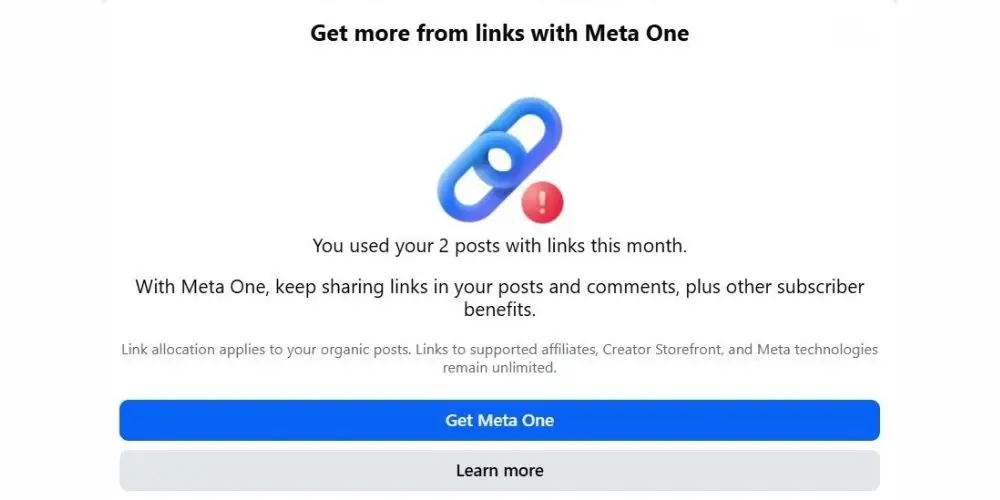
If you’ve tried to share a link from your Facebook business Page recently and seen a warning appear, you’re not alone. At the time of writing (October 2026), Meta has begun limiting many Facebook Pages to just two external links a month unless you pay for one of its new subscription plans. Pages here on the Costa del Sol and in the UK are already seeing it. If you use a Page to promote your business, events or blog, this will affect you, so we asked Meta for answers on your behalf. Here’s what you need to know.
Who does the link limit affect?
Meta’s published guidance refers specifically to organic posts and comments published by Facebook Pages.
It does not apply to personal Facebook profiles. This includes personal profiles using Professional Mode, which can continue sharing links in posts and comments.
The restriction is aimed at Pages representing businesses, organisations, communities and public figures. The clearest indication that your Page is affected will be the notification Facebook shows when you attempt to publish an external link.
What does the two-link allowance include?
An affected Page can include external links in up to two organic posts or comments each month.
Organic content is content that has not been paid for as advertising. An external link takes someone away from Facebook, perhaps to a website, blog, booking system, online shop, ticketing platform or another social network.
The allowance includes links placed in comments when the comment is published by the Page. Therefore, publishing a Page post without a link and then adding the link as the Page’s first comment does not avoid the restriction. That comment could still use one of the two monthly opportunities.
Meta explains the Page restriction in its Help Centre.
Why is Meta making the change?
The link allowance is connected to Meta One, a range of paid subscription plans for individuals, creators and businesses.
Meta says some of its higher business and creator plans include advanced publishing features, including links in organic posts and Reels. Prices, availability and included features can vary according to the account and region.
As a guide, Meta One business plans start at around US$14.99 a month (Essential), but this entry plan does not include additional links, so a Page on it is still limited to two. Links in organic posts are included from the Advanced plan, which starts at around US$49.99 a month, with larger allowances on the Expert (around US$149) and Max (around US$499) plans.
Prices are quoted in US dollars, and Meta says plans and pricing vary by country and account, so check exactly what Facebook offers your Page before subscribing. A summary of the plans is available from Overads.
In effect, Meta is placing a greater value on the ability of Pages to send people away from Facebook. Page owners who do not want to pay will need to decide which two direct Page links matter most.
More information about Meta One is available through the Meta Newsroom.
Can somebody else add the link in the comments?
Yes. Costa Women asked Meta specifically about this.
Meta confirmed that a link posted by somebody else in the comments beneath a Page post does not count towards the Page’s monthly allowance. The restriction tracks links published by the Page in its own organic posts and comments.
This means a Page administrator can publish the main post as the Page, switch to her personal profile and add the relevant link beneath it. The personal comment can be pinned when Facebook provides that option.
Check carefully that you are commenting as yourself and have not remained switched into the Page. This step must also be completed manually after the scheduled Page post has been published.
Can you share the Page post to a personal profile?
The original Page post can also be shared to a personal Facebook profile, with the external link added to the accompanying personal message.
The shared post and link are published by the personal profile, not by the Page. They should not use the Page’s allowance.
This gives Page administrators and supporters another way to direct people to the article, event or booking page. It also allows them to explain personally why they believe the information is worth reading.
There is no need for several people to repeat the same link beneath the original post. One useful personal-profile comment, supported by genuine personal shares, should be enough.
What about Facebook Groups?
Costa Women also asked whether links shared within Facebook Groups count towards the Page limit.
We were told that Group posts and comments are not currently included. The restriction is focused on content published directly on the Page and comments written by the Page.
Relevant links can therefore continue to be shared in Costa Women Groups. However, the content should still be useful and appropriate for the particular Group rather than becoming a stream of promotional links.
Meta can apply separate spam controls to repetitive or excessive posting, so links should always be accompanied by helpful context.
Are Stories and Highlights included?
We asked Meta whether links in Facebook Stories and Highlights count towards the two-link allowance, and were told that they are currently exempt.
A Facebook Page can therefore add a clickable link sticker to a Story. That Story can then be saved to a Highlight so that people can find it after the original 24-hour period has ended.
For now, this is one of the strongest alternatives available. However, Meta changes its features regularly, so Page owners should continue checking account notifications.
Will a written website address count as a link?
This depends on where it appears.
Typing an address such as costawomen.com in a Facebook Page caption or comment is risky. Facebook may recognise and automatically convert it into a link, even when it does not include https://. Page owners should, therefore, not assume that removing part of the address will protect their allowance.
A website address placed within an image or video is not clickable. However, Meta has technology capable of recognising text contained in visual content, so we cannot guarantee that it will always be ignored.
A written address may help people remember where to go, but it should not be treated as a confirmed loophole. For important content, use the routes Meta has clarified: personal-profile comments, personal shares, Groups, Stories and Highlights. You can also mention in the post, “check out our link in bio and visit the blogs page” for example.
What about video, Lives and voiceovers?
Video, Facebook Live and voiceovers are a great way to tell people where to find more information. You can say your website address out loud. Spoken words are not a link, so they do not use your Page’s allowance.
For example:
“You’ll find the full details on our website, costawomen dot com, under the Business tab.”
What to avoid is typing the web address into the Page caption, because Facebook may turn it into a clickable link that counts towards your two. Keep the caption link-free and point viewers to the clickable link in the personal-profile comment or Story instead:
“You’ll find the full article through the link in the comments and in today’s Story.”
You can also display a brief message such as “Link in the comments and Story” on the video itself.
What about taking a screenshot?
Taking a screenshot may remove some information attached to the original file, but it does not make the content invisible to Meta.
Facebook can analyse text and images using several different signals. There is no dependable evidence that taking a screenshot will prevent it from recognising a written website address.
Does this affect scheduling tools such as Missinglettr and Metricool?
The limit is applied by Facebook to the Page itself, not to the app used to publish. Scheduling tools such as Metricool, Missinglettr, Buffer, Hootsuite and Meta Business Suite simply send your post to Facebook, which then checks it against the Page’s allowance.
A scheduled post containing a link therefore counts in exactly the same way as one published by hand. Once the two links have been used, further scheduled link posts may fail to publish. Links scheduled as an automatic “first comment” can count too, because the comment is still published by the Page. Metricool explains this in its help guide.
Posts without a link are not affected, and you can continue to schedule them as normal. A post saying “Read our latest blog for the full details” is fine, as long as the web address is not typed into the caption and no link preview is attached. Add your own image or video so the post is not published as a link post. Missinglettr’s own support guidance notes that a text-only Facebook post can be published with an automatic link preview to your website, which is another good reason to attach an image.
Tools that share links automatically are most likely to be affected. Missinglettr, for example, creates a series of posts from each blog article, and most of them link back to it. Automatic blog-to-Facebook sharing and services such as Zapier can also use up the allowance without anyone noticing.
If you use one of these tools, check which scheduled Facebook Page posts contain links and switch off any automatic link-sharing to your Page. Schedule the posts without links, then add the link from your personal profile once the post is live.
Save the two direct Page links for priorities
If your Page is limited to two external-link posts or comments each month, decide in advance which campaigns deserve them.
These might include a major event, important booking deadline, paid programme, membership campaign or time-sensitive announcement.
If several people manage the Page, keep a shared record of the links used. Include the date, destination and name of the person who published it.
A Trello card, shared document or calendar note will be enough. The important thing is that administrators do not unknowingly use the allowance on routine content.
Check the permanent links on your profiles
Your website should remain easy to find even when an individual post does not contain a link.
Check that the website information on your Facebook Page, Instagram biography, LinkedIn profile, Google Business Profile, email signature, and WhatsApp Business account is correct and up to date.
If your Facebook Page has an action button, make sure it points to the most useful permanent destination.
You could also create a short page on your website containing links to current events, recent articles, membership information and contact details.
Publish more useful content directly on Facebook
Not every post needs to direct people elsewhere.
Upload videos directly to Facebook. Turn the main points of an article into a carousel. Create Facebook Events for activities and meetings. Share useful extracts, checklists, photographs and practical information that can be understood without leaving the platform.
The post should still offer value to people who do not continue to the website.
Use QR codes with care
A QR code can be useful on printed material, presentation slides or an image being viewed on a computer.
It is less convenient when somebody sees it on the same phone they would need to scan it with. Some phones can read a QR code from a saved image, but not everyone knows how to do this.
Use a QR code as an additional option rather than the only way to reach a destination.
Your website and email list matter more than ever
This change is another reminder that businesses and communities should not depend entirely on social media.
A Facebook audience is valuable, but Meta controls the platform. It decides which posts are shown, which features remain free, and how Pages can direct people elsewhere.
Your website is your permanent online home. Your email list gives you a direct route to people who have chosen to hear from you.
A newsletter platform such as Substack can be a simple way to build that list. Unlike Facebook, your subscribers belong to you, and you can take them with you if you ever move.
Read 12 things we learned about using Substack well.
Social media remains important, but it should lead into a wider communication system rather than being the whole system.
For now, the practical response is to protect the Page’s two direct links, use personal-profile comments and shares, continue posting relevant resources in Groups, make use of Stories and Highlights, and keep checking for further changes.
Stay connected with Costa Women
The best way to make sure you never miss Costa Women news, events and articles is to join our mailing list at costawomen.com and, if you are not already a member, our Costa Women community on Mighty Networks. Neither depends on Facebook, so you’ll hear from us directly, whatever Meta decides next.
Have you found another way to deal with the link limit? Share it with other members in our Costa Women Groups or on Mighty Networks. We’re all working this out together.